How Can I Make a Travel Map of My Adventure Journey?
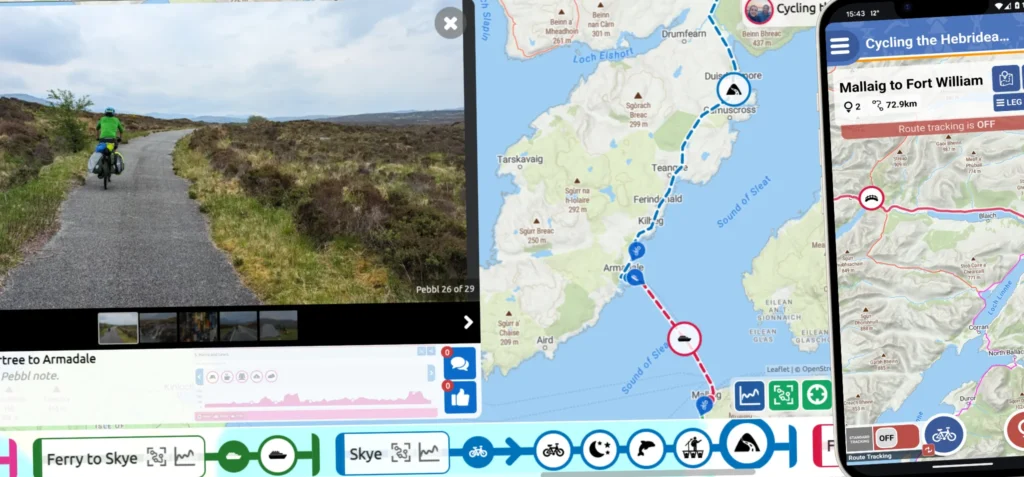
Creating an interactive adventure map is a fantastic way to capture the essence of your travels. It's not just about marking where you've been. It's about preserving the memories that make each journey special. With an adventure map, you're building a visual story that you can revisit anytime and easily share with others.
Pebbls is the perfect app for creating personalized, interactive adventure journey maps, and it's free! With Pebbls, tracking your journey is really easy. You can effortlessly track your route, add photos, jot down notes, and mark key waypoints (we call them Pebbls), all within an easy-to-use platform. Plus, you can share your map in real time, allowing others to experience your adventure as it unfolds.
Map My Adventure Travel Journey: Getting Started
1. Start Your Journey
- Sign into the Pebbls app and follow the steps to create a new journey.
- Give your adventure a name that captures the spirit of your trip, add a description to set the scene, and set your initial mode of transport.
2. Track Your Route
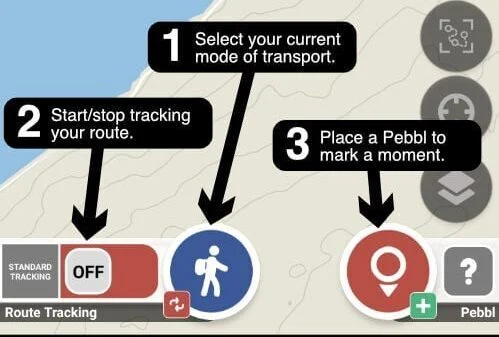
- Choose between Standard Tracking (periodic updates) or Live Tracking (real-time updates).
- When you're ready to go, just tap the tracking toggle.
- You can pause tracking (using the tracking toggle) whenever you need to, giving you full control over your journey.
3. Drop Pebbls and Share Your Map
- Mark important spots by dropping "Pebbls" along your route.
- View your map and share it with others through social media or embed it on your own website or blog.
Enhance Your Journey Mapping Experience
- Transport Type: Choose your mode of transport, whether it's walking, cycling, sailing, or something else, to organize your journey. You can switch between modes of transport as you travel.
- Sections/Legs: Break your journey into sections called "legs" to keep everything organized, especially on multi-day trips or when your adventure has different segments.
- Elevation Charts: Pebbls automatically generates elevation charts, so you can see how your altitude changes throughout the trip. This is super handy for hikes or bike rides where elevation is a big part of the adventure.
- Embedding Your Map: Want to showcase your adventure on your website or blog? Pebbls makes it easy. Just use the "Share" option in the app to grab an embed code and add your interactive map to your site.
- Look Back Anytime: Your map stays accessible in Pebbls, letting you revisit your journey whenever you like. Whether it's months or years later, you can always go back and relive the adventure.
Visit the Pebbls Guide for more details and useful tips.